Well-Architected review
The Well-Architected review tab assesses your diagram against the Google Cloud Well-Architected Framework — 6 pillars, 37 core principles and 174 recommendations — and flags AI-workload findings when Vertex AI is drawn. The structure — frozen corpus, five statuses, impact × likelihood, Eisenhower prioritisation, SMART goals — follows the AWS aws-well-architected-review skill, applied to Google Cloud.
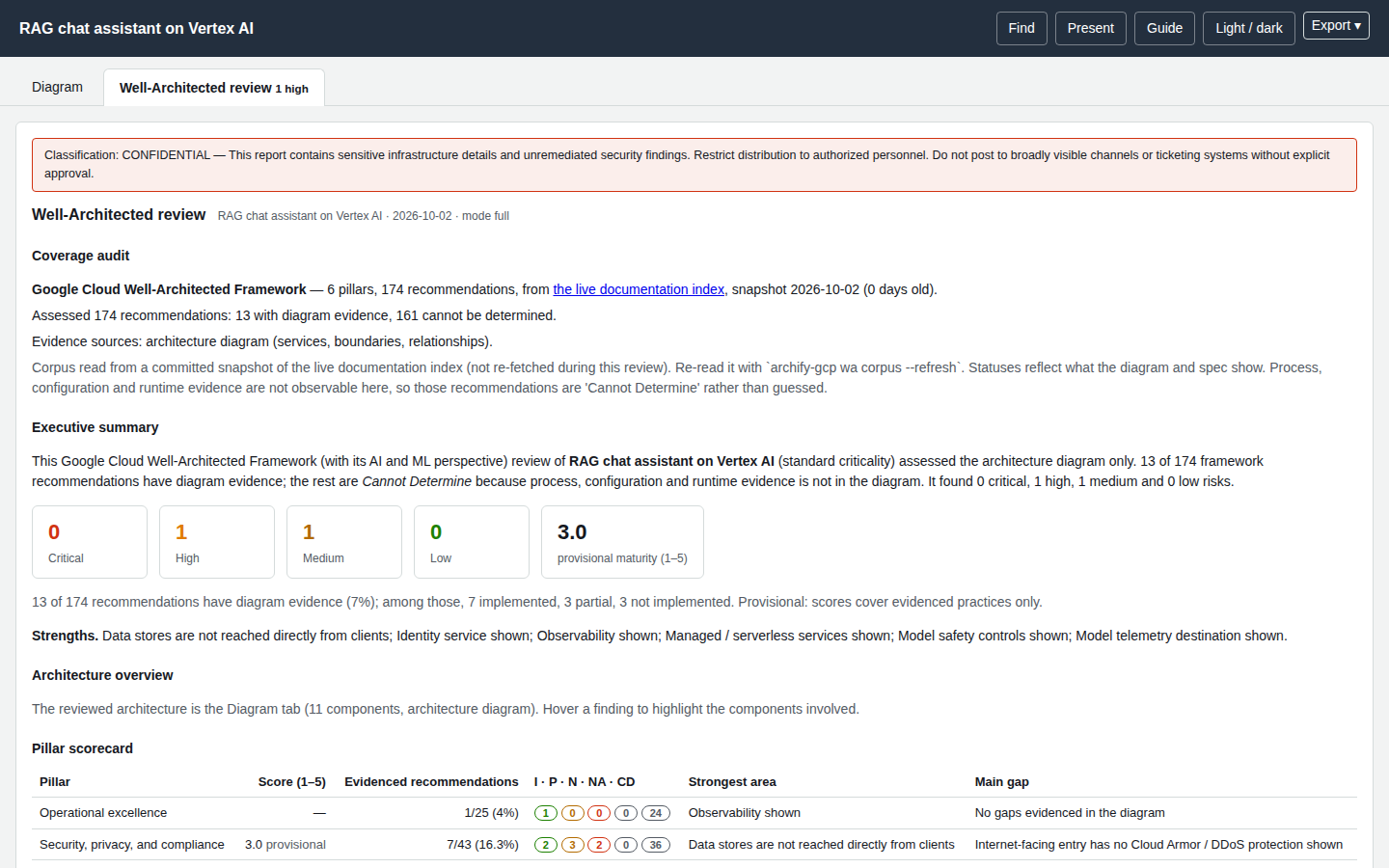
A diagram is not the workload
The review reads which services and boundaries you drew and how they connect. It cannot see configuration, process or runtime behaviour. Most best practices therefore stay Cannot Determine — that is reported, never hidden — and the maturity score is provisional. It does not certify compliance.
How an assessment is built
- A frozen corpus. Pillars, principles and recommendations are read from the Google Cloud Well-Architected Framework pillar pages (
/architecture/framework/<pillar>/printable) and snapshotted indata/wa/framework.json. Google does not number them, so ids are derived from page order:REL-3is the third principle of Reliability andREL-3.1its first recommendation. Ids are stable for a snapshot, never invented, and re-derived onwa corpus --refresh. A principle is reported like a question; informational principles without recommendations are left out. -
One status per BP, from five:
Status Used when Implemented The diagram (or cost estimate) shows the practice. Partially Implemented Shown in part, or shown but with a gap. Not Implemented The diagram shows the opposite (for example a database in a public subnet). Not Applicable The practice does not apply to this architecture. Cannot Determine The diagram is not evidence either way. A hint says what evidence is needed (process, IaC/configuration, runtime). -
Risk = impact × likelihood for each gap:
Likelihood Low Medium High Impact Severe High High Critical Moderate Medium Medium High Minor Low Low Medium A workload
criticalityofcriticalraises impact for Security and Reliability gaps;lowsoftens Reliability. Something that is merely not drawn is less certain than a drawn defect, so its likelihood is reduced and it appears under To confirm instead of as a finding. 4. Prioritisation (Eisenhower). Importance is high for Critical/High risks; effort is low or not. The quadrants are Do First, Plan, Delegate, Defer, each finding has an owner and a SMART goal with a target date and a success measure. 5. Pillar scores 1–5 = 1 + 4 × (implemented + ½ partial) ÷ evidenced BPs, shown only when at least three BPs are evidenced, and marked provisional when under 25 % of the pillar is evidenced.
What the tab contains
Following the skill's report template, top to bottom:
- a CONFIDENTIAL classification banner (the report describes unremediated findings; do not post it in broadly visible places);
- Coverage audit — corpus source and age, how many recommendations were assessed, evidenced and undeterminable, and the evidence sources used (the diagram, and the cost estimate when present);
- Executive summary with counts per risk, strengths, and the provisional maturity score;
- Pillar scorecard (six pillars, including Sustainability);
- Per-principle table with status, risk and key evidence;
- the full best-practice ledger — every BP, no truncation, filterable by status, pillar and free text;
- Findings grouped Critical → Low, each with evidence, impact × likelihood, recommendation, priority and owner;
- To confirm — things not drawn, which may exist but be undrawn;
- Cross-pillar trade-offs computed from the cost estimate (for example the cost of Cloud SQL high availability against reliability, or Cloud Logging volume against observability);
- the Eisenhower matrix, remediation plan with SMART goals, and next steps.
Controlling it
archify-gcp wa review spec.json                          # full review in the terminal
archify-gcp wa review spec.json --mode score             # scorecard only
archify-gcp wa review spec.json --mode pillar --pillars security,reliability
archify-gcp wa review spec.json --filter critical-high   # hide Medium/Low findings
archify-gcp wa review spec.json --criticality high --json
| Option | Values |
|---|---|
--mode |
full (default); pillar (full detail for the pillars in --pillars); quick and score (scorecards and findings, without the per-question and per-BP tables) |
--pillars |
pillar ids such as security,reliability (with --mode pillar) |
--filter |
all, critical-high, critical |
--criticality |
low, standard, high, critical (or meta.workload.criticality) |
--no-cost |
do not include cost evidence |
In the spec: meta.workload (name, criticality, description), meta.lens, and meta.guardrails: true when safety controls (Model Armor, safety filters) exist outside the drawing. meta.review: false, or --no-review on render/finalize, removes the tab.
Reading the result sensibly
- A short list of findings is not "good". Look at the coverage audit: with 12 of 174 recommendations evidenced, five out of five on a pillar means "nothing wrong in what is drawn", not "mature".
- Do not add decorative icons to turn a finding green. Either the control really exists (add it with its connection) or it is out of scope.
- Use To confirm as a checklist for the architecture review conversation.
- The AI-workload rules recognise Model Armor or safety filters, vector stores, request-response logging, Private Service Connect and VPC Service Controls, agent tool governance and human review when they are drawn and named plainly.
Corpus
archify-gcp wa corpus                       # counts and snapshot age
archify-gcp wa corpus --refresh             # re-read the live the Google Cloud documentation pages (network)
A refresh runs the skill's validation gate (canonical IDs, no duplicates, every recommendation belongs to a known pillar (with its prefix) and a known principle, every pillar and principle has at least one recommendation, no pillar holds over 60 % of all recommendations) and refuses to save an invalid corpus.