Images, SVG and draw.io
| Format | How | Notes |
|---|---|---|
| HTML page | render, finalize |
Standalone: no external requests. Diagram, Cost and Well-Architected tabs. |
| SVG | render --svg, finalize, or Export ▾ in the page |
The page export is a dual-theme SVG (light, switching to dark when the viewer prefers it). Viewer state (focus, dimming, route, passport) is stripped. |
| PNG | render --png, finalize, or Export ▾ (also JPEG, WebP, copy to clipboard) |
Needs Chrome/Chromium. |
| draw.io | export, render --drawio, finalize, or Export ▾ → Download draw.io (.drawio) |
Uses draw.io's own AWS shapes. See below. |
| JSON receipt | finalize |
Hashes and check results; see Quality gates. |
draw.io
The file opens in draw.io / diagrams.net (desktop, web, or the VS Code extension) and is fully editable.
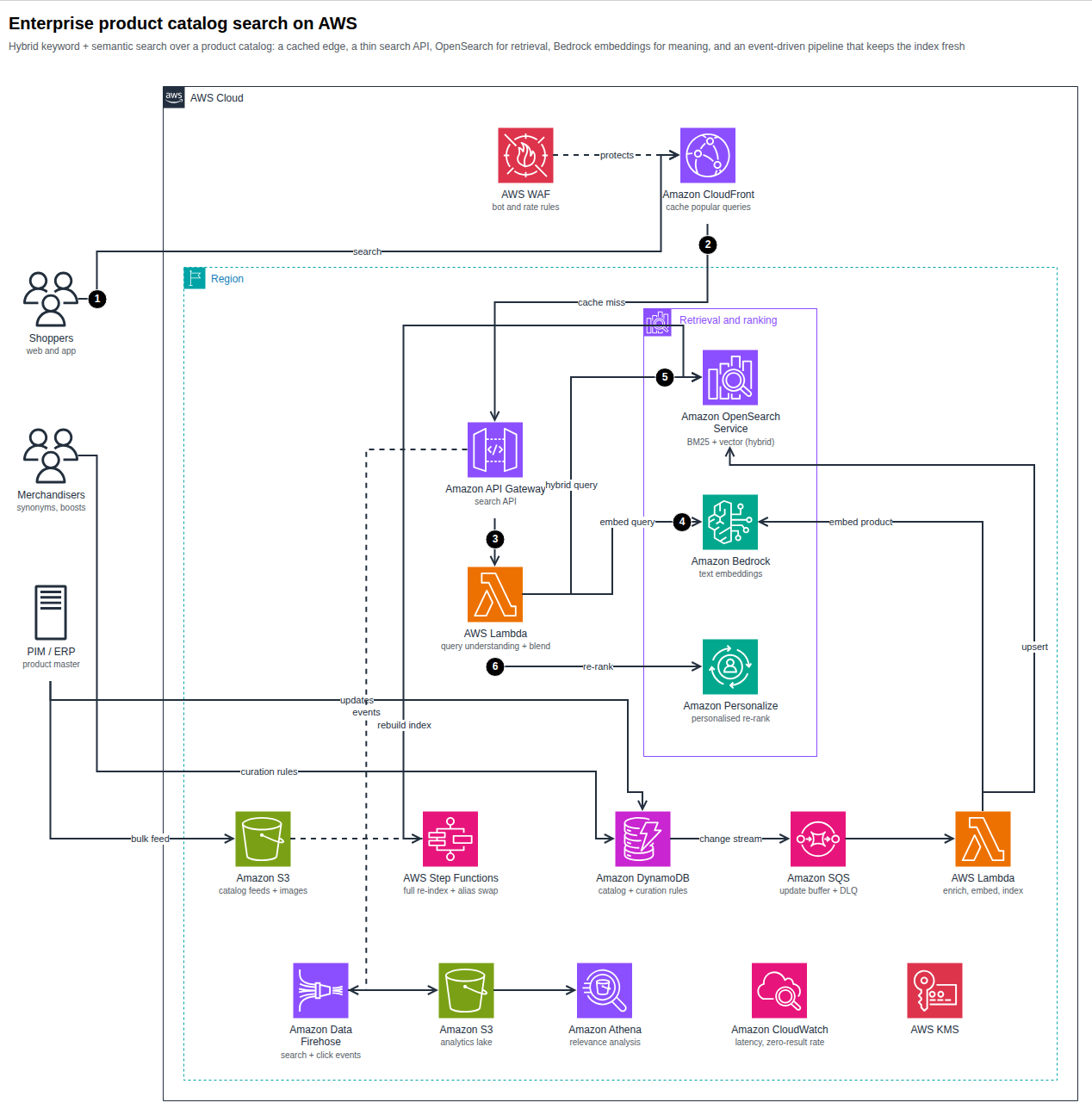
What maps to what:
| archify-aws | draw.io |
|---|---|
| Service icon | mxgraph.aws4.resourceIcon with resIcon=mxgraph.aws4.<service> and the AWS category colour |
| Resource and general icons | mxgraph.aws4.<shape> |
| AWS Cloud, Region, VPC, subnets, account, Auto Scaling group… | mxgraph.aws4.group containers with grIcon=group_*; AZ, security group and generic groups use draw.io's plain dashed/solid containers |
| Nested groups | Real containers: move a group and its children follow |
| Edges | Attached to their icons, with the original waypoints and exit/entry points, open arrowheads, dashed style |
| Numbered callouts | Black numbered circles; the step description is the tooltip |
| Sequence diagram | Icons, dashed lifelines, message edges, alt/loop/par frames and notes |
Notes on fidelity
- Layout is the archify-aws layout. draw.io may re-route an edge a little when you drag things.
- An icon without a draw.io equivalent (a few AWS Elemental appliances) is embedded as the official SVG instead of failing;
exporttells you how many. - Edge labels are real edge labels (they follow the edge); callout circles are separate shapes.
- The export is validated before it is written (unique ids, every reference resolves, every
mxgraph.aws4.*name exists in draw.io's library).
Presentation and documents
- Use
--theme darkfor slides and keeplightfor documents. Training and certification diagrams should use light. - For a portrait page (Word, blogs) prefer
columnlayouts at the root. - PNG size follows the diagram; scale it in your document rather than re-flowing the spec.
Icon licensing
Icons are © Amazon Web Services, Inc. or its affiliates. Use them to depict AWS architecture, do not alter them, and do not imply AWS endorsement. Rendered pages embed the icons they use; check the current AWS terms before publishing diagrams widely.